|
Pond Volume
Now here's a quick way to obtain a simple pond volume in AutoCAD. Select the pond contours by crossing (or whatever you prefer), order is not important because Pond Volume will sort the selection set by elevation. Pond contours (underwater) must be closed polylines assigned their correct Z (elevation) value. The pond topography cannot contain any mounds or depressions, which form "island" contours.
|
Typical pond contours being
selected by crossing (Left), |
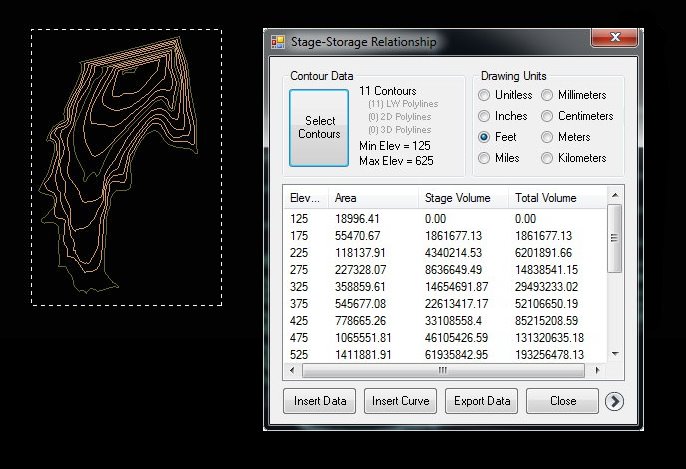
Immediately after selecting the contours you can see the Data Table to see the total volume, and the volume at each contour elevation. Pond Volume takes the elevation and area data and puts it in a table (as shown above). The first column is elevation, second column is the contour area, third column is the volume from the last elevation to the current, the fourth column is a cumulative total. Pond Volume uses a simple average-end-area method of calculating volumes.
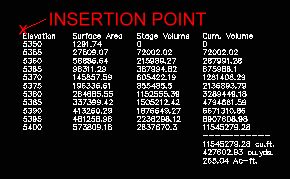
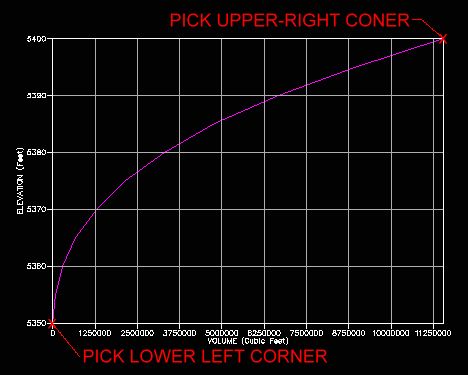
If you desire to publish the pond data in your drawing, the Data Handling tab has buttons to import either the table view or a stage/storage line graph in to AutoCAD. Shown below is the Table and Graph that Pond Volume Curve. You specify font style and size, insertion point and size of the graph, Pond Volume will automatically select an appropriate interval for the grid.
|
|
Data inserted in AutoCAD
Volume Curve inserted in AutoCAD |
|
Also available in the Data Handling tab is an Export button. You can export to various formats such as ASCII text, tab delimited text, and comma delimited text. Comma delimited text (CSV) is recognized and can be opened using MS Excel.
Version Information
| Program Name: | Pond Volume |
| Application Type: | Plug-in and VBA |
| Distribution Format: | ZIP file (470 kb) |
| Last Updated: | April 14, 2012 |
| AutoCAD Version: | AutoCAD 2000 or Later * |
| Current Version: | 2.0 |
* VBA version included for AutoCAD 2009 (and earlier)
Download Now... |
 |
Only $7.95 u.s. |
 Compatible
This download contains a .NET compiled DLL plug-in specifically designed for AutoCAD. The demand load feature allows Pond Volume to automatically load every time AutoCAD starts, making it a easy to use addition to the normal AutoCAD command set. Installation is a breeze using a windows setup program. This download also contains a VBA version (for AutoCAD 2009 and earlier). The use of AutoCAD plug-ins requires workstation administrative privileges.
| Questions or problems regarding this web site should be directed to Webmaster@CADmentor.com Copyright © 2001-2020 Mark R. Juneau. All rights reserved. |
| AutoCAD
is a registered trademark of AutoDesk, Inc. All other products mentioned are registered trademarks or trademarks of their respective companies. |